The Ultimate Auto Dialer Software Guide for 2026
If your team is still dialing phone numbers by hand, you’re wasting time, burning out reps, and leaving revenue on the table. Modern auto dialer software can automate the entire outbound calling process...

If your team is still dialing phone numbers by hand, you’re wasting time, burning out reps, and leaving revenue on the table.
Modern outbound calling software can automate the entire outbound calling process, skipping bad numbers and voicemails so reps only spend time on live conversations. With the right setup, it’s realistic to 2–3x talk time without hiring a single extra SDR.
This guide walks through what an auto dialer is, how it works, the different types of dialers, and how to choose and use one so your outbound calls actually turn into pipeline.
What Is an Auto Dialer?
An auto dialer (or automated dialer) is software that automatically calls phone numbers from a list and connects answered calls to an available agent or a recorded message.
Instead of reps typing each number and listening to rings, busy tones, and hang‑ups, the auto dialer runs through the list for them. It detects unanswered calls and voicemails, drops anything that doesn’t connect, and only routes live human answers to your team.
In simple terms: an auto dialer is an outbound dialer that turns manual calling into a streamlined, automated workflow so reps can focus on talking—not dialing.
How Auto Dialer Software Works Behind the Scenes
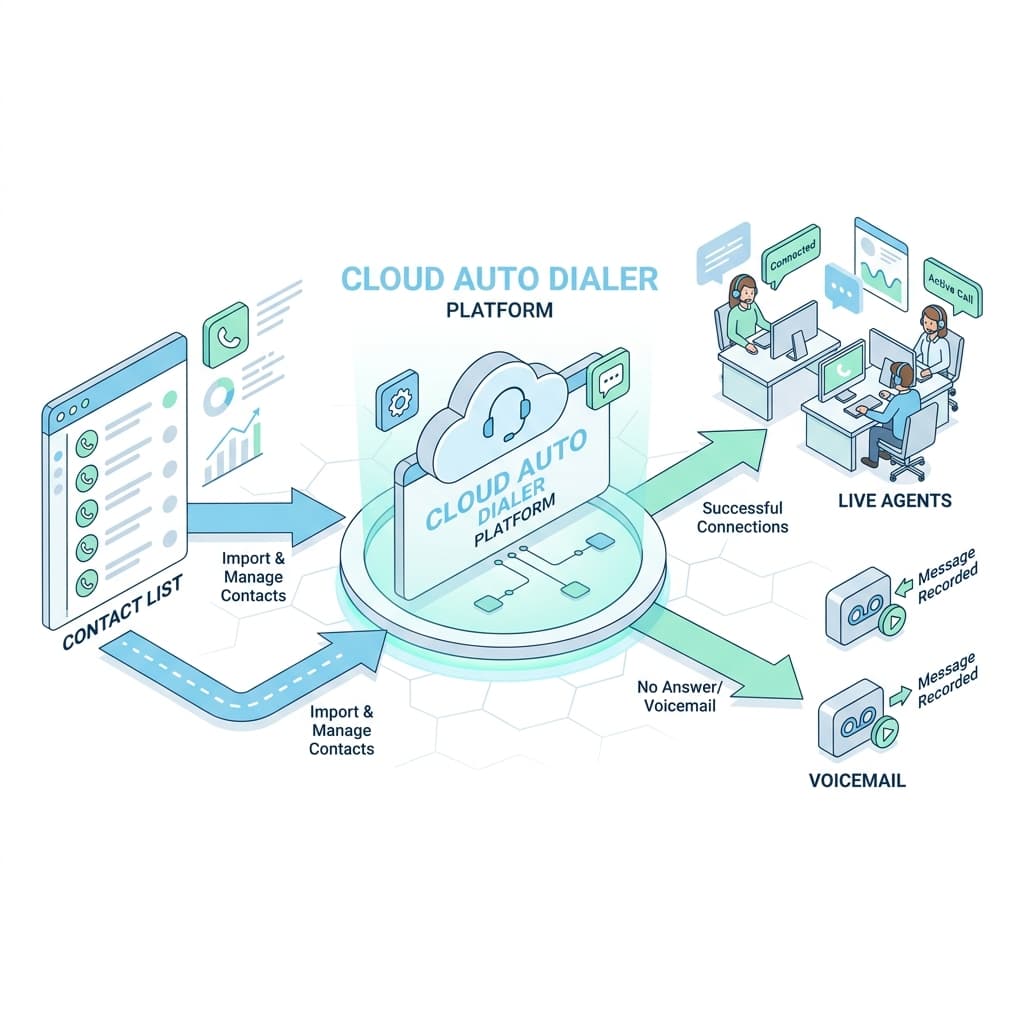
Most modern auto phone dialers are cloud‑based and connect directly to your CRM and contact lists. Behind the scenes, the flow looks like this:
-
You load a list.
Contacts come from your CRM, marketing automation, or a CSV file with names, numbers, and context. -
The dialer starts calling automatically.
Based on your chosen mode (progressive, power, predictive, or agentless), it starts placing calls in the background. -
Call‑progress detection filters noise.
The system listens for busy signals, fax tones, and voicemail picks, and quickly drops them instead of wasting rep time. -
Live calls are connected to reps.
When a real person says “hello,” the sales dialer routes that call to an available agent or plays a pre‑recorded message. -
Data flows back into your CRM automatically.
Call outcomes, notes, and recordings get logged in real time, so reporting stays accurate without manual updates.
Some advanced platforms layer on AI to optimize call timing, detect voicemail more accurately, and surface performance insights for managers.
The Main Types of Auto Dialers (and When to Use Each)
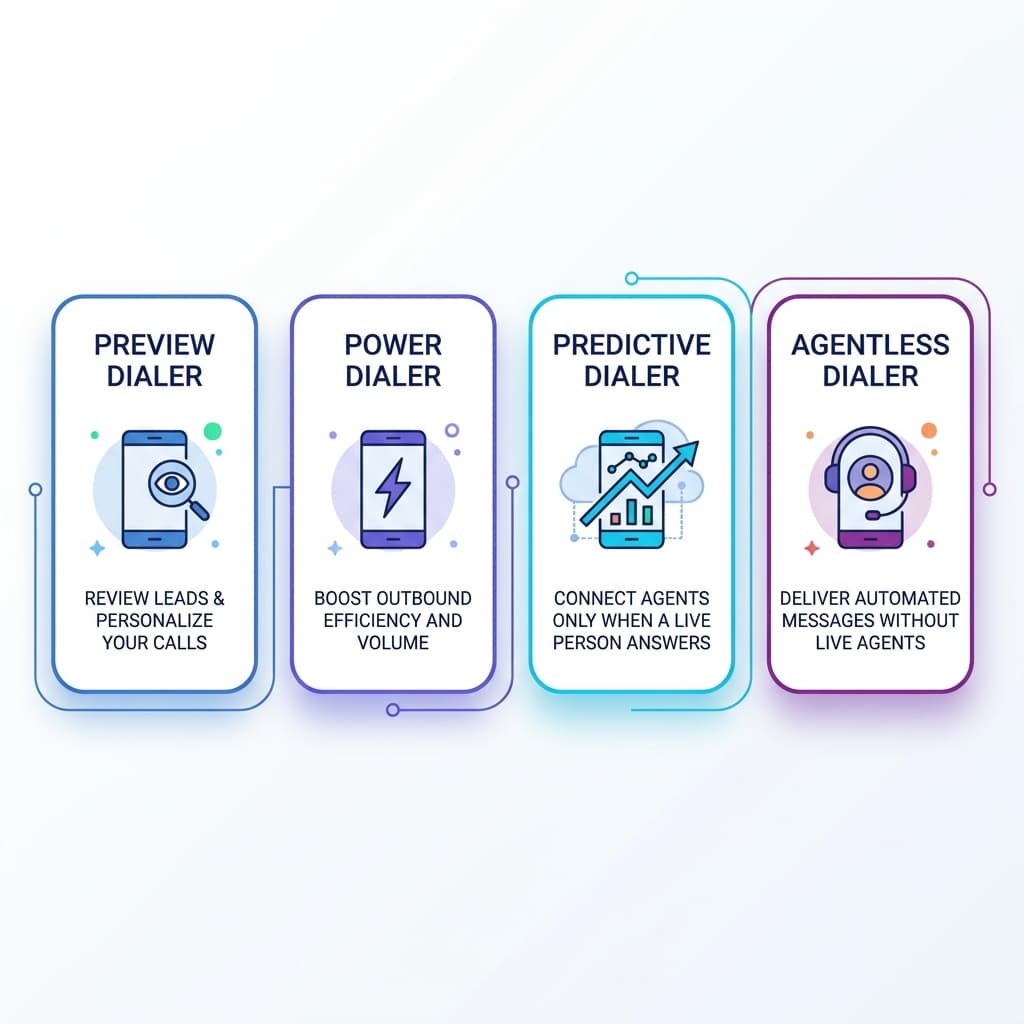
Not every calling system behaves the same way. Choosing the wrong mode can either leave reps idle or hurt call quality. These are the core types you need to know.
Progressive Dialer
A progressive dialer calls one contact per available agent. As soon as a rep finishes a call, the system automatically dials the next number.
Use this when:
- Each conversation is high‑value.
- You can’t risk calls connecting without an agent on the line.
- Your team runs B2B outbound or follow‑up work where context matters.
Power Dialer
A power dialer dials multiple numbers per agent based on a ratio (like 3 numbers per available rep).
This is perfect when:
- You need high‑volume cold calling or SDR outreach.
- You have reasonably large lists.
- You want to massively increase calls per hour without losing too much control.
Because it calls more numbers in parallel, a power dialer can significantly increase call volume and is perfect for high‑throughput campaigns like SDR outbound, cold calling, or event follow‑ups.
Predictive Dialer
A predictive dialer uses algorithms to predict when agents will finish their calls, and it starts dialing the next batch in advance to keep them constantly busy.
Best for:
- Large call centers with many agents.
- Campaigns where maximizing utilization matters more than a perfectly seamless experience.
Because predictive dialers push the limits, they must be configured carefully to avoid abandoned calls and compliance issues.
Agentless / Voice Broadcast Dialer
An agentless dialer (voice broadcast) calls numbers and plays a pre‑recorded message or IVR menu instead of connecting to a human agent.
Use it for:
- Payment reminders.
- Appointment confirmations.
- Alerts, surveys, and notifications where two‑way conversation isn’t required.
Why Auto Dialers Are a Cheat Code for Sales Teams
Done right, an auto dialer does far more than “dial faster.” It fundamentally changes how your team spends its time.
1. 2–3x More Talk Time
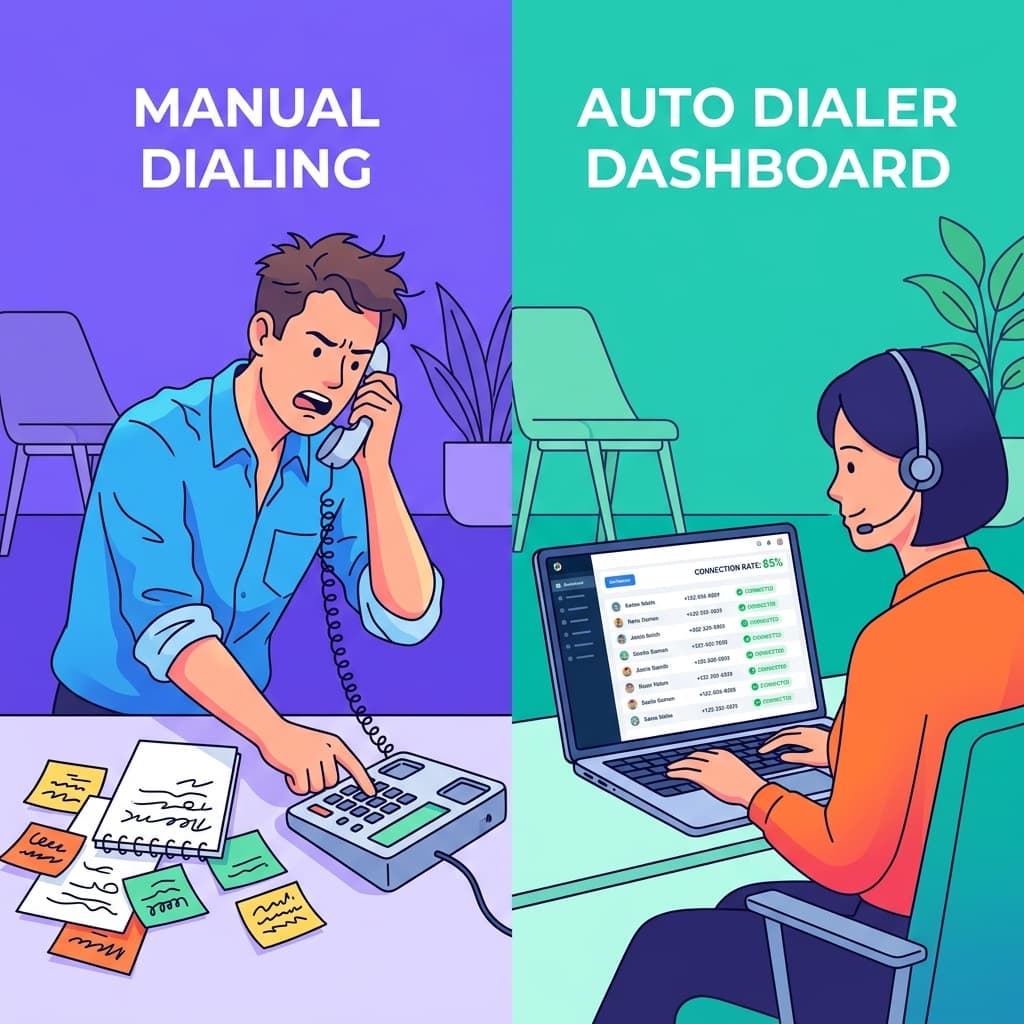
By eliminating manual number entry and dead air, sales dialers can increase talk time by up to 300% compared with manual dialing.
That means a rep who used to make 40–50 manual calls and have 10–15 real conversations per day might now handle 80–120 calls and 30+ live conversations—with the same working hours.
2. Better Connect Rates and List Coverage
These calling systems plow through busy, invalid, and no‑answer numbers automatically, so your team actually touches more of your list in the same time frame. For time‑sensitive campaigns—like post‑webinar follow‑ups or event leads—that extra coverage can be the difference between “we managed to reach everyone” and “we left half the list untouched.”
3. Clean, Reliable Data
When your sales dialer is integrated with your CRM, every call is logged with outcomes, timestamps, and recordings without reps needing to remember to fill anything in.
Managers can finally trust dashboards on:
- Calls per rep.
- Connection rates.
- Meetings booked.
- Conversion from call → opportunity.
That data feeds better coaching and smarter decisions.
4. Compliance and Call Reputation
Modern platforms include compliance‑oriented features such as:
- Handling Do‑Not‑Call lists.
- Support for STIR/SHAKEN caller ID authentication.
- Controls to reduce the risk of spam labeling and blocked calls.
This keeps your outreach on the right side of the law and improves the chance that calls actually reach buyers.
Auto Dialer vs “Auto Phone Dialer”: Any Difference?
Terms like auto dialer, automated dialer, auto phone dialer, and outbound dialer all generally refer to the same class of tools: software that automatically dials lists of numbers and connects live calls to agents. If you're building a modern outbound sales tech stack, this is essential.
In practice, all refer to software that:
- Automatically dials phone numbers from a list.
- Filters out non‑connects.
- Connects live answers to agents or messages.
Don’t get hung up on the exact wording. Instead, compare platforms based on features, dialing modes, integration, analytics, and compliance.
Must‑Have Features in an Auto Dialer for 2026
When you evaluate auto dialer tools, treat this list as your non‑negotiables.
Multiple Dialing Modes
Your software should support progressive, power, and predictive dialing (even if you only plan to use one mode at first).
This gives you flexibility to adapt as your team and use cases change.
Deep CRM Integration
Look for native integrations with your CRM so you can:
- Pull segmented lists automatically.
- Update contact records with calls and notes.
- Trigger workflows and follow‑up sequences based on outcomes.
This removes copy‑paste work and minimizes human error.
Call Recording, Analytics, and Dashboards
You should be able to:
- Record calls for training and quality control.
- See live and historical metrics on call volume, connection rates, and outcomes.
- Slice performance by rep, list, or campaign.
These insights are what turn raw dialing power into a real revenue engine.
Voicemail Detection and Drop
Accurate detection of answering machines plus the ability to drop pre‑recorded voicemails saves reps from repeating the same message dozens of times a day.
AI‑Powered Optimization
More platforms now use AI to:
- Find the best times of day to call specific segments.
- Prioritize hotter leads.
- Surface coaching insights based on call transcripts. This doesn’t replace your team, but it helps them work smarter.
Compliance and Spam‑Prevention Controls
Ask vendors what they offer around:
- Caller ID reputation management.
- STIR/SHAKEN attestation.
- Local presence numbers when appropriate.
- Do‑Not‑Call list handling and regulatory controls.
If they can’t answer clearly, be cautious.
Best Practices to Get the Most from Your Auto Dialer
Buying software isn’t enough. These practices determine whether your outbound calling system actually moves the needle.
Start with a Clean, Segmented List
Garbage in = garbage out. Clean your data, remove invalid numbers, and segment by:
- Persona and seniority.
- Industry and size.
- Intent or source (e.g., demo requests vs cold lists).
This lets reps tailor their openers and makes it easier to test which segments respond best.
Match Dialing Mode to Campaign Type
- High‑value accounts or complex sales → progressive dialer.
- High‑volume outbound / SDR work → power or predictive dialer.
- Broadcast notifications → agentless / voice broadcast.
Don’t treat every campaign the same; your dialer is a toolbox, not a single blunt instrument.
Set the Right Metrics
Track not just “dials per day,” but:
- Connect rate.
- Conversations per hour.
- Meetings booked per day.
- Pipeline created per campaign. Use your dialer’s analytics to spot bottlenecks—weak lists, poor scripts, or timing issues.
Blend Calling with Email and Social
Sales dialers work best as part of a multi‑touch sequence, not in isolation. Combine:
- Calls via auto dialer.
- Personalized emails.
- LinkedIn touches or connection requests.
This is the outreach pattern top‑performing sales teams use rather than relying on a single channel.
Coach from Real Calls
Use call recordings to:
- Build a library of “golden calls” to model.
- Identify where reps lose deals in conversations.
- Turn common objections into battle cards and script improvements.
Your dialing system should become a constant source of real customer language and feedback.
When Is It Time to Invest in an Auto Dialer?
You’re ready for an auto dialer when:
- Reps spend more time dialing and updating CRM than actually talking to prospects.
- You have repeatable outbound motions but struggle to reach enough people each day.
- You’re scaling from founder‑led sales to a small team and need structure and predictability.
At that point, an auto dialer stops being a “nice tool” and becomes core infrastructure for growth.
Auto Dialers in a Modern Revenue Stack
In 2026, an auto dialer shouldn’t be just another disconnected tool. It should plug into a broader revenue stack that includes:
- Your CRM and pipeline.
- Email and sequence automation.
- AI coaching and analytics.
- Lead generation, enrichment, and competitor intelligence systems.
When these pieces are integrated, outbound calling becomes a controllable, measurable engine—not a random flurry of cold calls.
If your team is serious about hitting aggressive targets without endlessly adding headcount, upgrading from manual calling to a well‑configured auto dialer is one of the highest‑leverage moves you can make.
Frequently Asked Questions (FAQ)
Is auto dialer software legal?
Yes, auto dialer software is legal, but it is heavily regulated in many countries. In the US, the TCPA (Telephone Consumer Protection Act) requires that businesses only use auto dialers to call consumers who have given prior express written consent, especially for telemarketing. For B2B sales (business-to-business), the rules are often less strict, but you must still honor Do-Not-Call (DNC) lists and maintain compliance with local regulations like STIR/SHAKEN to verify caller ID.
Do auto dialers work with CRM?
Yes! The most effective automated dialing systems feature seamless CRM integration. When an auto phone dialer is connected to a CRM, it can automatically pull call lists, dial numbers, and instantly log the call outcomes, durations, and notes back into the contact record. This removes manual data entry and ensures your team's reporting is accurate.
What is the difference between an auto dialer and a predictive dialer?
An auto dialer is a broad term for any software that dials numbers automatically. A predictive dialer is a specific type of auto dialer that uses algorithms to dial multiple numbers per agent before they are even finished with their current call, predicting when they will be available. Other types include power dialers (dials the next number as soon as the rep is free) and progressive dialers (dials one number per available rep).
Written by
Jake Morrison
Head of Content, Switchstack
Jake has spent 8 years writing about sales technology, dialer systems, and outbound strategy. Before Switchstack, he led content at a leading sales engagement platform.
Newsletter
Tactics worth your inbox.
Outbound tactics and product updates — only when we have something genuinely worth sharing.