Progressive Dialer 101 – How It Works and Where It Fits in Your Sales Stack
If you’re seeing “progressive dialer”, “how does a progressive dialer work”, and “features of a progressive dialer” in your search data but not getting clicks...

If you’re seeing “progressive dialer”, “how does a progressive dialer work”, and “features of a progressive dialer” in your search data but not getting clicks, it means people have questions you haven’t answered clearly yet.
This guide explains, in plain language, what a progressive dialer is, how it works, how it compares to other dialer types, and where it fits inside a modern B2B sales tech stack for small and midsize teams.
What Is a Progressive Dialer?
A progressive dialer is an outbound calling mode where the system automatically dials the next number in a list as soon as an agent finishes their current call and becomes available.
Unlike aggressive predictive dialers that place multiple calls per agent and then try to match whoever answers to whoever frees up, a progressive dialer always dials one call per ready agent, which greatly reduces abandoned calls and ensures customers only get connected when a human is actually ready to talk.
Because it controls pacing based on live agent availability, progressive dialing is popular with sales and customer‑service teams that care about call quality and customer experience, not just raw volume.
How Does a Progressive Dialer Work?
Behind the scenes, a modern progressive dialer system follows a straightforward cycle.
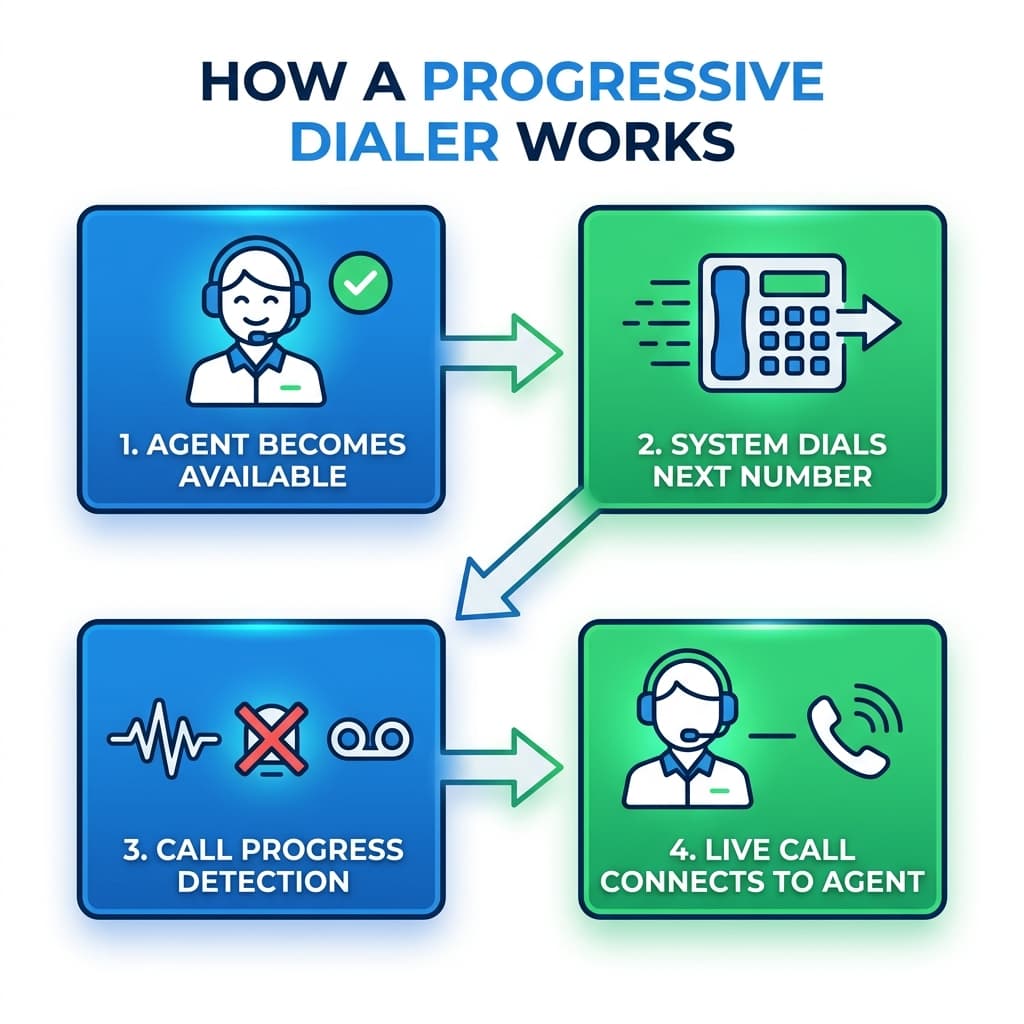
Agent finishes a call The dialer monitors agent status. When a rep hangs up and completes any wrap‑up work, their status changes to ready.
Dialer automatically places the next call The dialer pulls the next record from a campaign or call list and dials that number immediately—no manual typing or click‑to‑call needed.
Call‑progress detection It listens for busy tones, network errors, invalid numbers, and voicemail messages, and only connects the call if it detects a live human answer.
Connects the call to the agent As soon as a live person picks up, the call is connected to the free agent, and the customer’s details pop on the agent’s screen so they have context.
Logging and disposition The system logs call result, duration, and disposition codes in the dialer and, in good setups, pushes that data directly into the CRM.
This “agent‑first, one‑call‑at‑a‑time” model is exactly what differentiates progressive dialing from predictive dialing, which starts multiple calls per agent and accepts a certain level of abandoned calls as a trade‑off for maximum talk time.
Progressive vs Predictive vs Power vs Preview Dialers
Your queries include “preview dialer vs progressive dialer”, “progressive vs predictive dialer”, “outbound power dialer”, and “what is progressive dialing”, so it’s important to clarify how the modes differ.
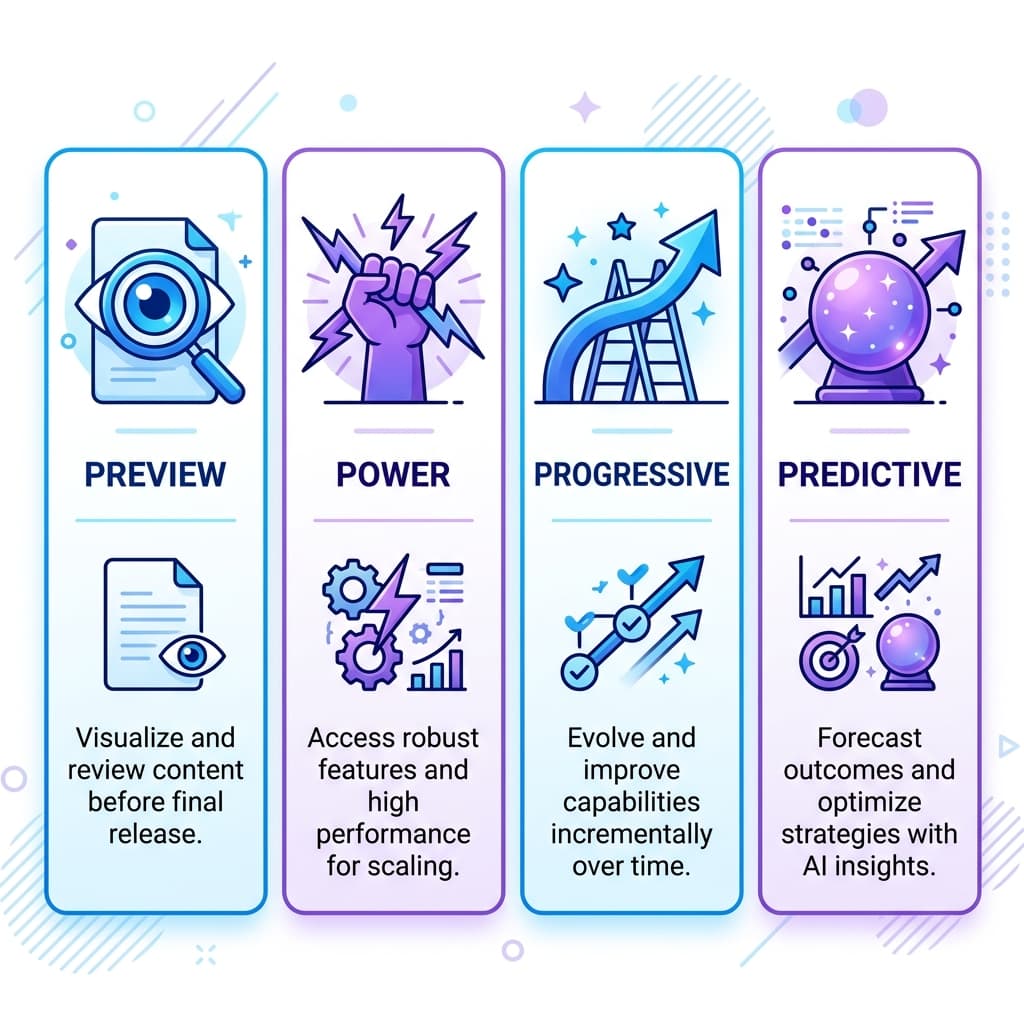
Preview dialer Shows the next contact’s information and lets the agent decide when to dial. Best when each conversation is high‑value and requires prep (complex B2B deals, regulated industries).
Power dialer Automatically dials the next number from the list as soon as the current call ends, often with less sophisticated pacing and call‑progress logic than progressive. Focused primarily on speed—more calls per hour—but with less control over timing and prep.
Predictive dialer Uses algorithms to predict when agents will become free, dialing multiple numbers per agent in advance, then routing answered calls to whoever is available. Maximizes volume and talk time but can create abandoned calls when customers answer and no agent is free at that exact moment.
Progressive dialer Automatically dials one number per available agent, and only when that agent is ready. Balances efficiency with customer experience by minimizing dead air and reducing abandoned calls compared with predictive dialing.
That’s why many contact‑center and outbound guides position progressive dialing as the middle ground between fully manual or preview dialing and aggressive predictive systems.
Key Features of Progressive Dialer Software
Your search terms also include “features of a progressive dialer”, “progressive dialer tool”, and “contact center software progressive dialer”, which map directly to feature‑and‑buying‑guide content.
Modern progressive dialer software for call centers and outbound teams usually includes:
- One‑to‑one call‑to‑agent mapping – one call per available agent, no multi‑line flooding.
- Automatic call‑progress detection – skips busy, disconnected, and voicemail responses so agents spend time on live conversations.
- Campaign and list management – tools to manage campaigns, set priorities, and handle retries by rule.
- CRM integration – syncing contacts, call logs, and outcomes with CRM records to create a unified timeline per customer.
- Compliance controls – time‑zone rules, call‑window restrictions, DNC list checks, and configurable recording behavior.
- Analytics and reporting – dashboards showing connect rates, talk time, abandonment, agent utilization, and campaign performance.
When those pieces are missing or poorly configured, you get the classic “common problems with auto dialers”: dropped calls, poor data, and frustrated agents.
How Progressive Dialers Improve Call Center Performance
Several contact‑center vendors highlight progressive dialers as a way to raise productivity without destroying customer experience.
Higher agent utilization By always having the next call ready, progressive dialers cut out manual dialing time and much of the “dead air” from ringing and busy tones.
Compared with manual dialing, progressive systems can make outbound teams two to three times faster at reaching live contacts because agents no longer waste time on failed calls and number entry.
Fewer abandoned and dropped calls Progressive dialers only dial when an agent is free, so customers almost never pick up to silence and then get hung up while the system hunts for someone.
That directly answers queries like “Can a progressive dialer reduce abandoned calls?” and “How does a progressive dialer prevent call abandonment?”—they’re designed to do exactly that by avoiding over‑dialing.
Better customer experience Because agents get customer details on screen before or as the call starts, they can deliver more informed, personalized conversations.
Contact‑center glossaries note that progressive dialers are particularly well‑suited to sales, renewals, surveys, and customer service where rapport and compliance matter more than pure volume.
Compliance: Are Progressive Dialers Telemarketing‑Law Friendly?
Your queries include “Is a progressive dialer compliant with telemarketing laws?” and “How does a progressive dialer handle do‑not‑call lists?”, which are critical questions for outbound teams.
Most reputable contact center platforms with progressive dialing offer:
- DNC (Do‑Not‑Call) list management to automatically block prohibited numbers from campaigns.
- Time‑zone and schedule controls so you only dial within allowed local hours.
- Recording controls and announcements to meet consent and telemarketing disclosure rules.
From a regulatory perspective, progressive modes are often easier to keep compliant than predictive because they don’t intentionally generate large volumes of abandoned calls—one of the main risk factors in high‑speed dialing.
Where a Progressive Dialer Fits in Your B2B Sales Tech Stack
Your queries also include “sales tech stack”, “B2B sales tech stack”, “outbound sales tech stack”, and “switchstack”, which are about how the dialer ties into the rest of your tools.
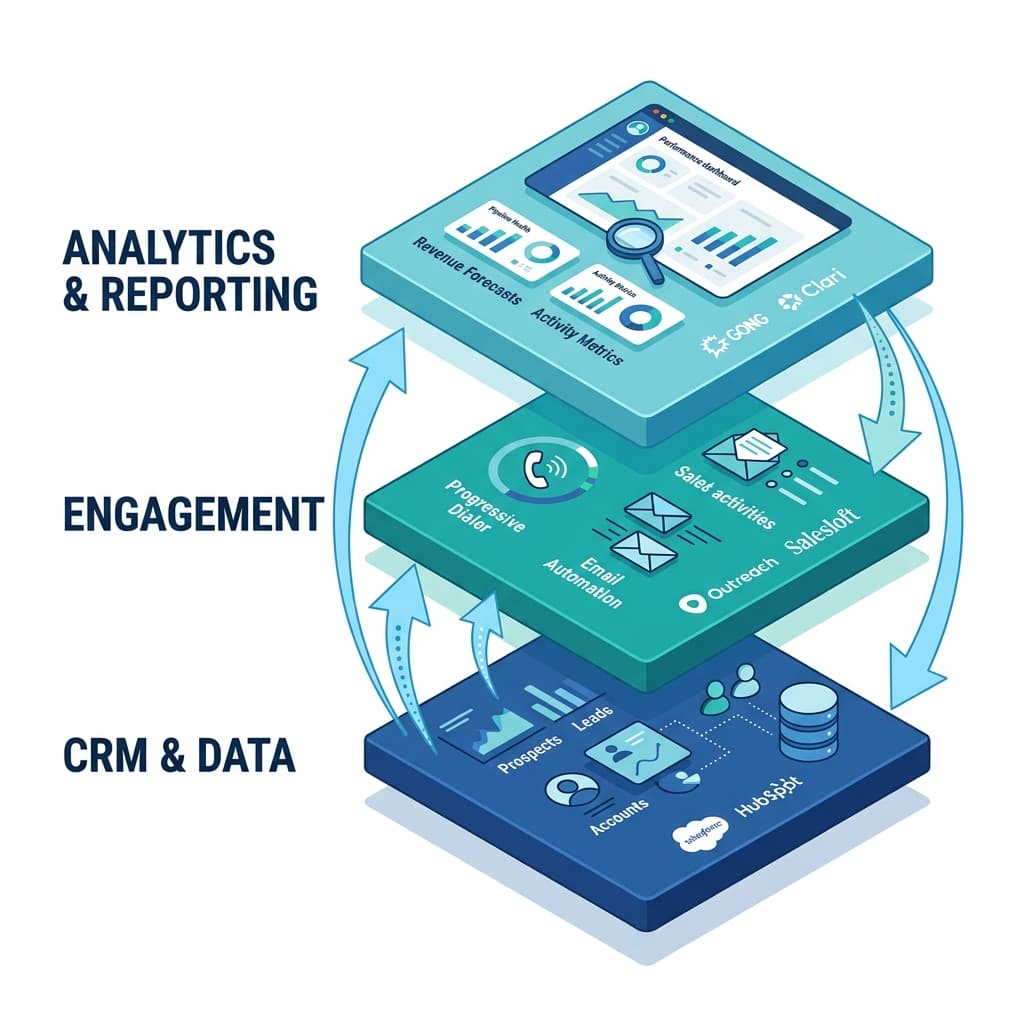
Most 2026 sales‑stack guides describe four or five core layers:
- CRM / pipeline (foundation) – system of record for contacts, accounts, deals.
- Engagement / outreach – email sequences, dialer, SMS, LinkedIn.
- Data and enrichment – B2B data, enrichment, intent.
- Analytics and automation – reporting, workflows, forecasting.
- Optional AI – intelligence, coaching, and scoring.
A progressive auto dialer normally sits in the engagement layer, tightly integrated with the CRM:
- Outbound campaigns are fed by CRM views or lists.
- Calls, notes, and outcomes sync back to contacts, opportunities, and tasks.
- Dialer metrics (connect rate, talk time) flow into your analytics layer alongside email and other channels.
Stack benchmarks for B2B teams in 2026 note that efficient stacks rely on 6–9 core tools across layers, not dozens of disconnected apps, and that dialers with native CRM integration significantly reduce manual logging and data quality issues.
Is a Progressive Dialer Worth It for Small and Midsize Teams?
Several of your questions ask whether a progressive dialer is “worth it for my small business” or which options work best for smaller teams.
Roundups and how‑to guides indicate that progressive dialers provide the most benefit when:
- Your team makes enough outbound calls that manual dialing produces a lot of idle time.
- You care about customer experience and want to avoid predictive‑style abandoned calls.
- You run sales or service motions where some prep and personalization matter.
Vendor comparisons often suggest that teams under 10–15 agents get the best balance of utilization and compliance from progressive dialing, while very large B2C call centers sometimes prefer predictive modes if they can manage the risk.
If you’re already using a CRM and doing regular outbound calls, adding a progressive dialer for call center or sales team that integrates well is usually one of the highest‑ROI upgrades you can make to your sales tech stack.
Written by
Jake Morrison
Head of Content, Switchstack
Jake has spent 8 years writing about sales technology, dialer systems, and outbound strategy. Before Switchstack, he led content at a leading sales engagement platform.
Newsletter
Tactics worth your inbox.
Outbound tactics and product updates — only when we have something genuinely worth sharing.