Progressive Dialer for Small B2B Sales Teams in 2026 – Lean Stack, Real ROI
If you run a 5–15 person outbound team in 2026, you’ve probably heard this advice: “You need a power dialer like Kixie to hit volume.” By the time you’re done, you have three separate platforms...

If you run a 5–15 person outbound team in 2026, you’ve probably heard this advice:
“You need a power dialer like Kixie to hit volume.”
“You need Gong for coaching.”
“You need Salesloft to orchestrate everything.”
By the time you’re done, you have three separate platforms, a complex sales tech stack, and reps who still complain about too many tools and not enough calls.
For most small and midsize B2B teams, the better question is: Can we get 80–90% of the benefit with a progressive dialer for small sales teams that plugs into our CRM, instead of a bloated stack of point tools?
This guide walks through how to choose and implement a progressive dialer as part of a lean B2B sales stack, when to skip predictive and heavy power dialers, and how to think about Kixie, Gong, and Salesloft without overspending.
What small B2B teams actually need from a dialer
Dialer guides in 2026 all agree on one thing: the goal is more live conversations per hour, with less agent idle time and better reporting.
But for a 5–10 person B2B outbound team, that doesn’t mean you need the most aggressive setup possible. You typically need:
- A dialer that keeps reps in calls instead of typing numbers manually.
- Clean CRM integration so calls and dispositions log automatically.
- Solid recording and basic coaching, even if you can’t afford full Gong‑level revenue intelligence.
- Enough analytics to track connect rate, talk time, and meeting‑set rate.
Progressive dialing lines up almost perfectly with those needs because it automates outbound calling while still pacing calls one‑to‑one with agent availability.
Progressive vs power vs predictive: plain‑English differences
Most of your search questions boil down to: “Progressive dialer vs power dialer vs predictive – what’s the difference and which one is right for a small team?”
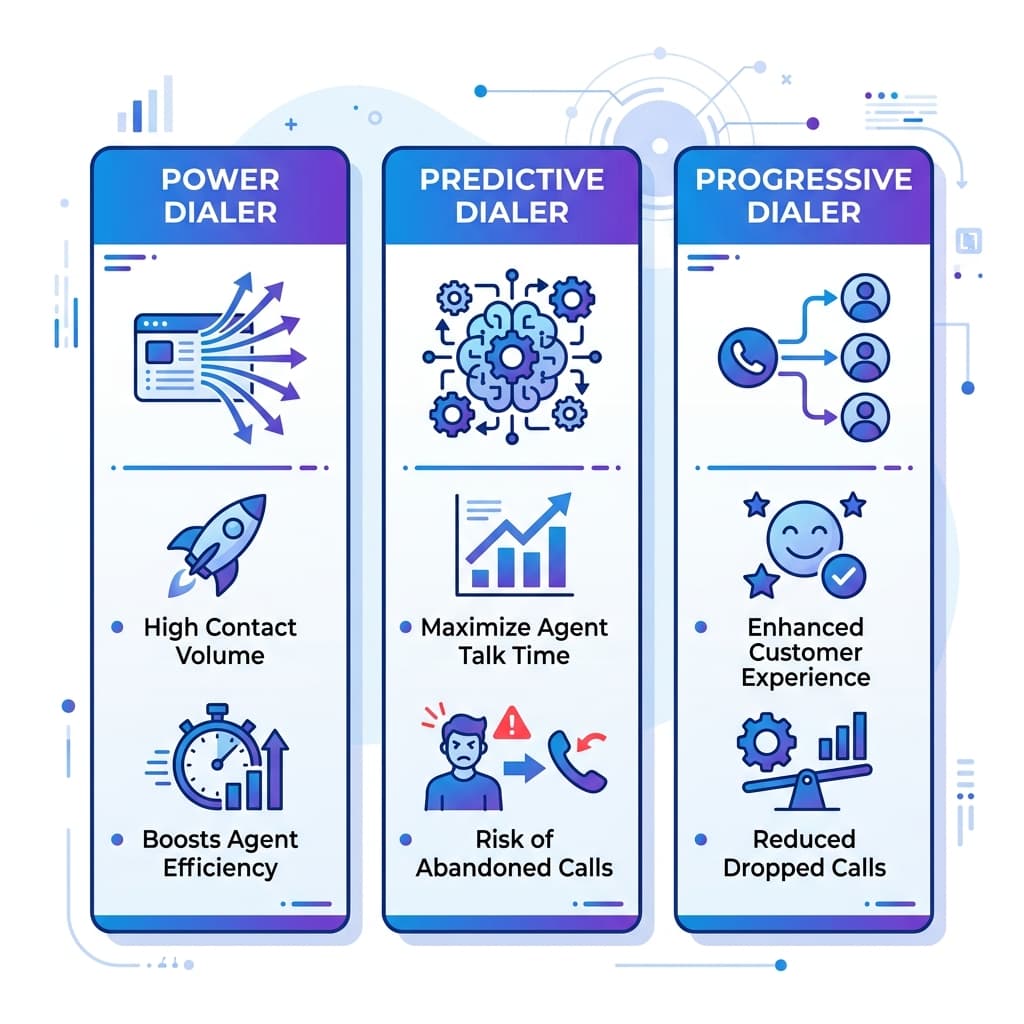
Power dialer
Dials the next number automatically as soon as the current call ends.
Often supports multi‑line calling, dialing several numbers at once for each rep to maximize connection attempts.
Tools like Kixie’s power dialer highlight 5× more live connections and 400–500% higher answer rates when combined with automation and local presence.
Great for raw volume, but if you’re selling higher‑value B2B and care about experience, it can feel intense for both reps and prospects.
Predictive dialer
Uses algorithms to predict when agents will be free, dialing multiple numbers per agent in advance and routing live answers to whoever becomes available.
Maximizes total talk time, but accepts a level of abandoned calls when no agent is free as soon as someone answers.
Most call‑center and telemarketing comparisons warn that predictive dialing is best suited to large B2C centers, not small B2B teams that care about each interaction.
Progressive dialer
Dials one number per available agent, and only after that agent wraps up their last call.
Uses call‑progress detection to skip busy tones, invalid numbers, and voicemail, connecting agents only when a live person picks up.
Reduces abandoned calls and “dead air” because it never over‑dials beyond live agent capacity.
Vendors and explainers position progressive dialers as the middle ground: much more efficient than manual or preview dialing, but safer and more customer‑friendly than predictive.
For a small or midsize B2B team, that balance is usually exactly what you want.
Can a progressive dialer replace Kixie, Gong, and Salesloft?
Some of your queries ask whether a progressive dialer can replace Kixie, Gong, and Salesloft combined. The short answer: it can replace some of what they do, but not everything.
Kixie
Kixie is an AI‑powered sales dialer with CRM integration, local presence, voicemail drop, SMS, and multi‑line power dialing.
A good progressive dialer that:
- Integrates directly with your CRM.
- Supports voicemail drops and call recording.
- Offers some local presence or caller‑ID control.
…can absolutely serve as a Kixie alternative for small teams, especially if you don’t need multi‑line power dialing or Kixie’s specific ecosystem.
Gong
Gong positions itself as a revenue and conversation intelligence platform: recording calls, transcribing them, analyzing talk patterns, and giving managers deep coaching and deal insights.
Some progressive dialers include:
- Call recording and storage.
- Basic analytics on talk time and outcomes.
- Simple coaching features (listen, whisper, barge).
That’s “good enough” for many small teams that just need recordings plus simple coaching, but it’s not the same as Gong’s full AI‑driven analytics and deal intelligence.
So a progressive dialer can reduce the need for Gong in smaller orgs, but it does not fully replace deep conversation intelligence.
Salesloft
Salesloft is a comprehensive sales engagement and revenue orchestration platform: sequences, integrated dialer, call recording, deal management, and forecasting.
For many small teams, buying Salesloft just to get a dialer plus sequences is overkill and expensive—analyses put pricing in the $125–$165/user/month range before add‑ons and increases.
Pairing a progressive dialer with:
- A simpler CRM that already has basic sequences, or
- A lightweight engagement tool
…can deliver much of the outbound value without the full Salesloft price tag.
Takeaway: For a 5–10 person B2B team, a strong progressive dialer + CRM + light engagement platform can often replace Kixie + Salesloft, and partially substitute for Gong’s call‑recording/coaching, while keeping your stack lean and costs under control.
How to choose a progressive dialer for small sales teams without bloating your stack
When you’re selecting a progressive dialer for a lean B2B sales stack, use these criteria instead of chasing every feature on the market.
1. CRM‑native or CRM‑first integration
Prioritize dialers that have native integrations with your CRM (Salesforce, HubSpot, Pipedrive, etc.) so calls automatically log to contacts, accounts, and deals.
Kixie, Salesloft, and similar platforms highlight this as a core advantage—your chosen progressive dialer should do the same.
If a dialer can’t reliably sync to CRM, it doesn’t belong in a lean stack.
2. Dialer modes and pacing
It must support progressive dialing mode; power or preview modes are a plus but progressive should be first‑class.
Avoid tools that only do predictive dialing unless you run a large‑scale telemarketing or collections operation.
3. Recording, coaching, and QA
Look for built‑in call recording with easy access for managers.
Bonus: simple QA features like scorecards or time‑stamped feedback on calls, even if they’re not full AI coach seats.
This lets you do practical coaching without buying a separate conversation‑intelligence platform right away.
4. Compliance and telemarketing laws
Ensure the dialer supports DNC list checks, time‑zone rules, and recording consent controls to comply with TCPA regulations.
Progressive dialing is generally easier to keep compliant than predictive because it doesn’t intentionally generate abandoned calls as part of its logic.
5. Pricing and total cost of ownership
Compare per‑user pricing with tools like Salesloft (often $125–$165/user/month) and the combined cost of Kixie + Gong + an engagement platform.
Factor in implementation and training time—sometimes a simpler tool with less setup has better real‑world ROI than a powerful but complex platform.
Progressive dialer ROI for a 5–10 person sales team
Dialer vendors and benchmarks consistently report that auto dialers increase live connections compared with manual dialing—power dialers claim big jumps (5× live connections, 400–500% higher answer rates in some Kixie + Make.com setups).
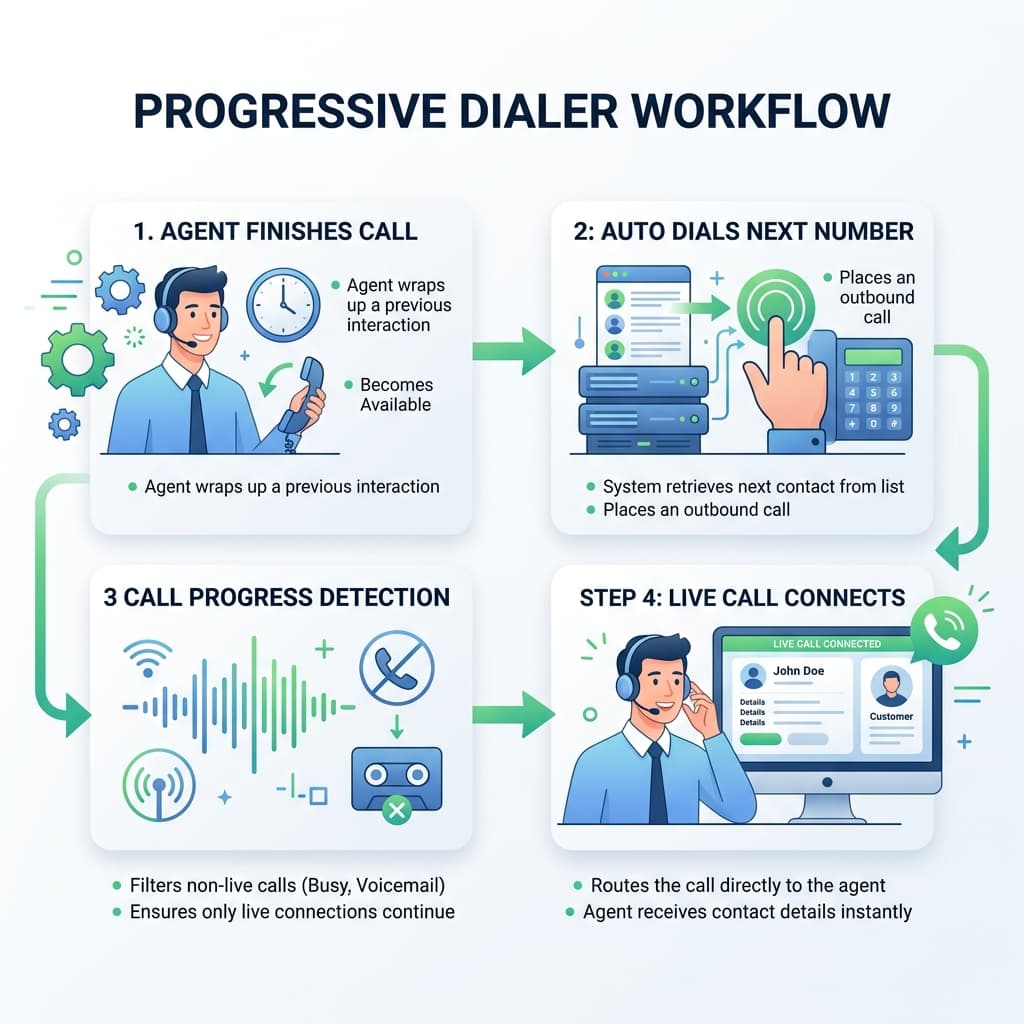
Progressive dialers won’t hit the absolute maximum volume of a multi‑line power or predictive dialer, but for small B2B teams they still deliver major gains:
- Agents no longer waste time manually dialing or listening to busy signals and voicemail.
- Every “ready” state triggers another call, which can lift conversations per rep per hour several times over manual dialing, according to dialer comparisons.
- Fewer abandoned calls and smoother connections improve customer experience and protect your brand.
The net effect is a meaningful increase in meetings and pipeline per rep, without the compliance and customer‑experience risks of predictive dialing.
Implementation playbook: setting up a progressive dialer without a big tech team
Your intent includes questions like “How to set up a progressive dialer without a tech team” and “Auto dialer implementation: how long before we see results?”. Here’s a practical approach for small B2B teams.
Phase 1: foundations (week 0–1)
- Clean up CRM phone fields and ownership so lists aren’t messy.
- Define one or two outbound playbooks (e.g., net‑new outbound SDR, renewal/upsell motion).
- Decide where the dialer will live: CRM‑native (ideal) or standalone with deep CRM integration.
Phase 2: pilot (week 2–4)
- Roll out the progressive dialer to 2–3 reps first.
- Build one initial campaign/list per playbook (e.g., target accounts, inbound MQL follow‑up).
- Train reps on daily workflow: logging into the dialer, handling dispositions correctly, using call recordings for self‑review.
You should start seeing productivity changes—more calls, more connects—within the first few weeks.
Phase 3: scale and optimize (week 4–8)
- Roll out to the full team once the pilot process feels smooth.
- Add basic call coaching: weekly call reviews using recordings, simple scorecards, and peer‑listening sessions.
- Tune pacing, call windows, and list logic based on connect rates and rep feedback.
By the end of 1–2 months, you’ll have a stable workflow and enough data to calculate ROI versus license cost and saved time.
Lean sales stack patterns: one tool vs many
Your broader theme is a lean sales stack: “Can one tool replace multiple platforms?”
Most 2026 sales‑stack benchmarks say high‑performing teams use 6–9 core tools across CRM, data, engagement, dialing, and analytics, rather than dozens of point solutions.
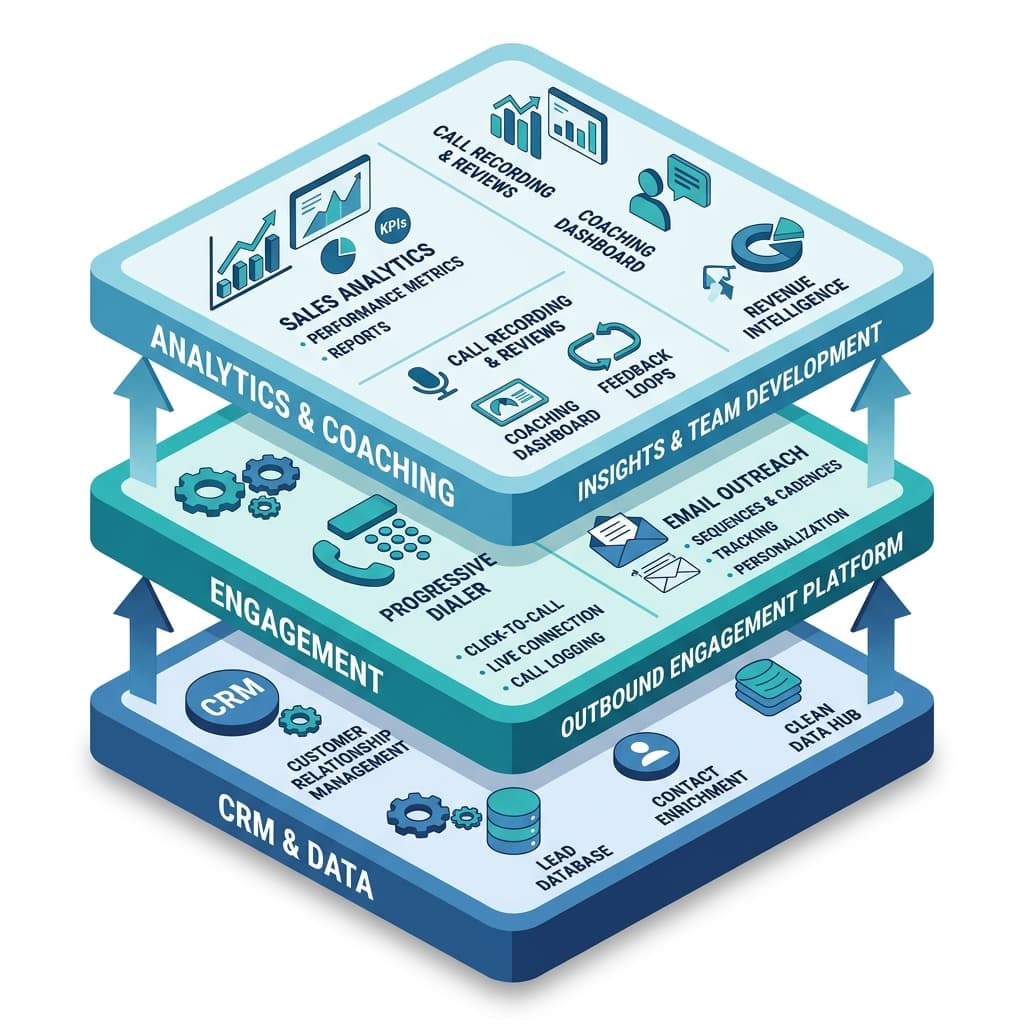
For a small B2B outbound team, a smart pattern looks like:
- CRM (Salesforce, HubSpot, Pipedrive, etc.) as the system of record.
- Engagement + progressive dialer (one platform, or two tightly integrated).
- Single data/enrichment source for leads.
- Optional basic coaching via dialer recordings, with Gong or similar added later if you truly need deep revenue intelligence.
This way you get:
- A modern outbound engine with a progressive dialer at its core.
- Good‑enough coaching and analytics for a 5–10 person team.
- Lower spend and far less complexity than a Kixie + Gong + Salesloft combo.
If you outgrow that setup, you can always layer on more specialized tools—but you won’t have burned budget and goodwill on platforms your team wasn’t ready for.
Written by
Jake Morrison
Head of Content, Switchstack
Jake has spent 8 years writing about sales technology, dialer systems, and outbound strategy. Before Switchstack, he led content at a leading sales engagement platform.
Newsletter
Tactics worth your inbox.
Outbound tactics and product updates — only when we have something genuinely worth sharing.