The Complete Guide to Auto Dialer Software in 2026
If your team is still manually punching numbers into a phone, you’re already behind. Modern auto dialer software automatically calls through your lead lists, filters out bad numbers and voicemails...

If your team is still manually punching numbers into a phone, you’re already behind.
Modern auto dialer software automatically calls through your lead lists, filters out bad numbers and voicemails, and connects reps only when a real person answers. That means more conversations, more meetings, and more pipeline—without adding more SDRs.
This guide breaks down, in plain English, what an auto dialer is, how it works, the different types, and how to use one to turn cold lists into real revenue in 2026. For a deeper dive into our tools, check out our built-in dialer.
What Is an Auto Dialer?
An auto dialer (automatic dialer or autodialer) is software that automatically dials phone numbers from a list and connects answered calls to either a live agent or a prerecorded message.
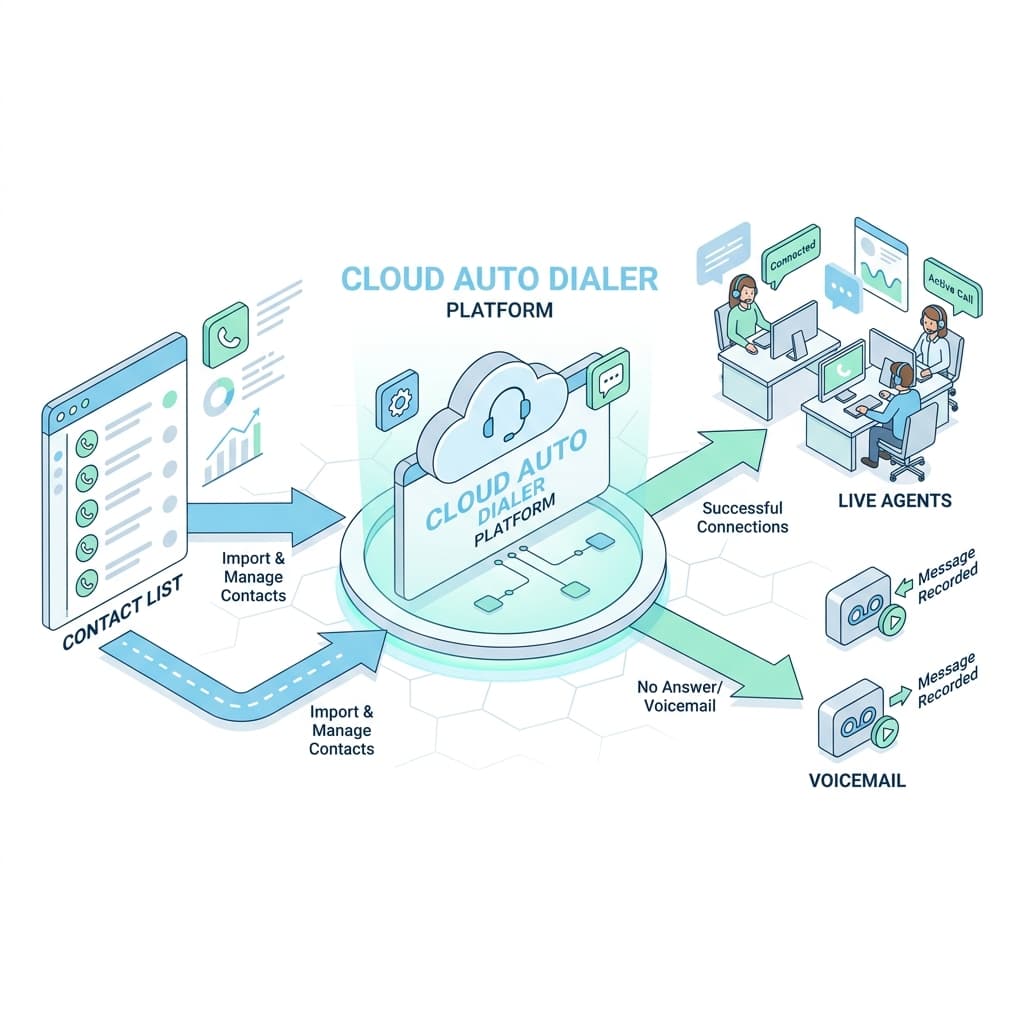
Instead of reps manually dialing and waiting through ringing, busy tones, and hang‑ups, the auto dialer:
- Pulls numbers from your contact list or CRM.
- Dials them according to rules you set.
- Detects what happens (live answer, voicemail, no answer, invalid).
- Connects only live answers to your team or to a voice flow.
Because the whole process runs digitally, call centers and sales teams can make hundreds or even thousands of outbound calls per day with the same number of people.
How Auto Dialer Software Works (Step by Step)
Behind the scenes, most cloud auto dialers follow the same basic flow.
1. Import and Segment Your Contacts
You start by importing a list of contacts—usually from your CRM, a CSV export, or an integrated marketing tool—with names, numbers, and any notes you want reps to see.
Good teams segment those lists by industry, persona, intent, or campaign so they can tailor scripts and measure performance by segment.
2. Choose the Dialing Mode
You pick a dialing mode depending on your goals: preview, power/progressive, predictive, or agentless (more on these below).
This mode controls how aggressively the system calls numbers and how much control agents have over each call.
3. Automatic Dialing and Call‑Progress Detection
The auto dialer begins placing calls from the list in the background.
It uses call‑progress detection to recognize:
- Busy signals and network errors.
- No‑answer / timeouts.
- Answering machines and voicemail.
- Live human answers.
Unproductive calls are marked and skipped so your team doesn’t waste time listening to ringing or leaving the same voicemail 50 times.
4. Connect Live Calls to Agents or Flows
When the system detects a live answer, it instantly connects the call to an available agent—or to an IVR menu or prerecorded message, depending on how the campaign is set up.
Agents get the contact’s info on their screen (often pulled from the CRM) just before or as the call connects, so they can have context‑rich conversations.
5. Log Everything Automatically
Finally, modern auto dialers log:
- Call start and end time.
- Outcome (connected, voicemail, busy, no answer).
- Disposition codes and notes.
- Recordings for quality and coaching.
This data syncs back to your CRM or analytics platform, giving you real numbers on call volume, connect rates, and conversion instead of guesswork.
The Main Types of Auto Dialers (And When to Use Each)
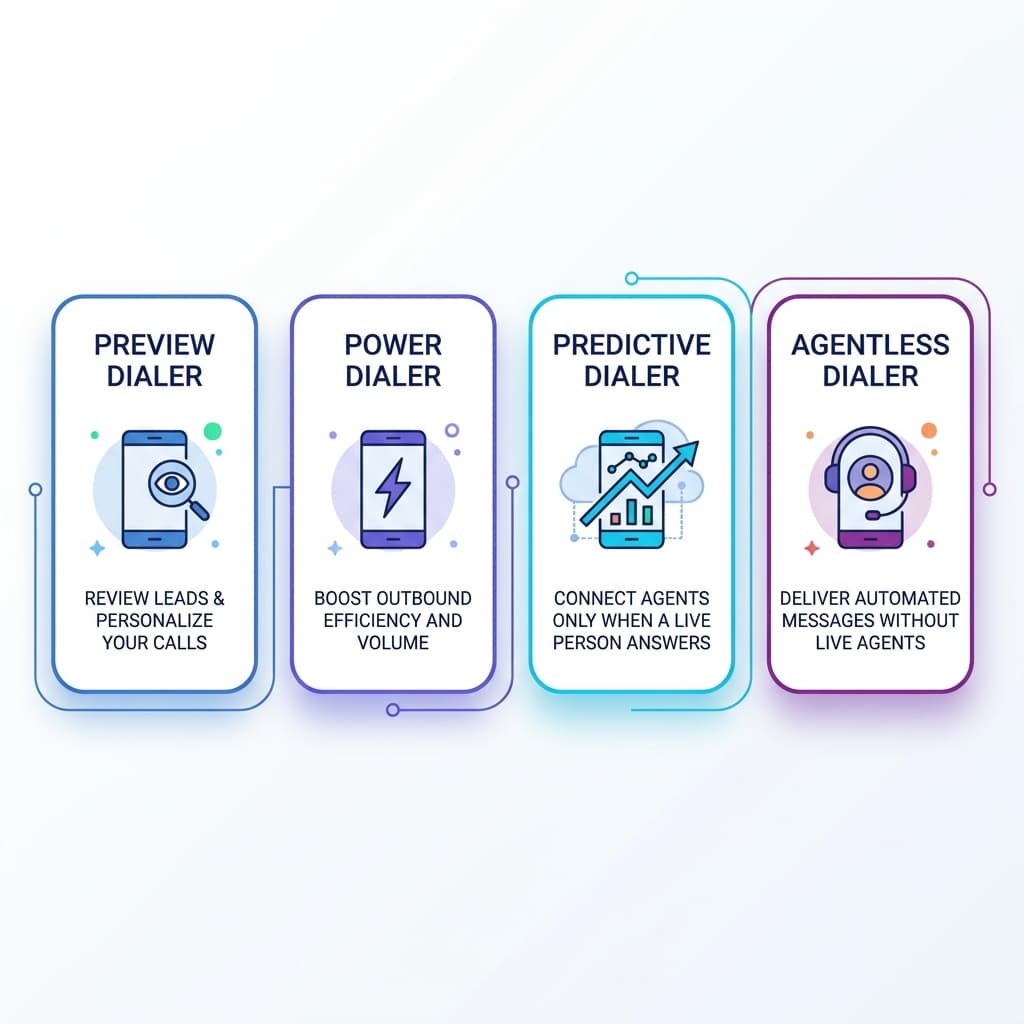
Choosing the right dialer mode is as important as choosing the tool itself. Here are the core types and their best use cases.
Preview Dialer
A preview dialer presents the next contact’s details to the agent, who can review the record and then choose to start the call.
Use a preview dialer when:
- Each conversation is high‑value or complex.
- Reps need time to review notes before they speak.
- Quality matters more than raw call volume.
It’s common in B2B, real estate, and healthcare where every call requires preparation.
Power / Progressive Dialer
A power dialer (sometimes called progressive) automatically places the next call as soon as the current call ends, keeping agents constantly engaged.
Use a power/progressive dialer when:
- You want to maximize calls per hour for your SDR team.
- Conversations are relatively repeatable (e.g., cold outbound, event follow‑ups).
- You still want one call per available agent, without over‑dialing.
This mode is often the “sweet spot” for outbound sales teams because it combines efficiency with a decent customer experience.
Predictive Dialer
A predictive dialer dials multiple numbers at once and uses algorithms to predict when agents will become free, connecting them to live answers the moment they’re available.
Best for:
- Large teams with many active agents.
- High‑volume campaigns where a small number of abandoned calls is acceptable (telemarketing, political outreach, survey work).
Predictive dialers maximize utilization, but they must be tuned to avoid connecting calls with no agent available or creating a poor customer experience.
Agentless / Voice Broadcast Dialer
An agentless dialer automatically calls numbers and plays prerecorded messages or menus, without involving an agent unless the customer chooses to route to one.
Use it for:
- Appointment reminders.
- Payment and delivery notifications.
- Simple surveys or announcements.
It’s not a fit for complex sales conversations, but it’s extremely efficient for one‑way communication.
Why Auto Dialers Beat Manual Dialing Every Time
1. Dramatically Higher Agent Productivity
Auto dialers eliminate the dead time between calls—dialing digits, waiting through rings, hitting busy signals, or getting voicemail.
Studies and vendor data consistently show that teams using auto dialers can handle far more calls and conversations per day than teams that dial manually. That translates directly into more meetings and opportunities.
2. Better Coverage of Your Lists
Because the dialer automatically skips unreachable numbers and keeps going, your team covers a much larger percentage of each list.
For campaigns tied to events, webinars, or limited‑time offers, that extra coverage can be the difference between fully capitalizing on interest and leaving half your leads untouched.
3. Consistent Data and Reporting
Manual dialing often means inconsistent CRM updates. Some calls get logged, others don’t.
When you use an integrated auto dialer, every call and outcome is recorded in a standardized way. You get reliable dashboards for:
- Calls per rep and per campaign.
- Connect rates.
- Meetings booked and conversion from call to opportunity.
That makes it much easier to coach, forecast, and adjust.
4. Better Customer Experience When Configured Correctly
With preview and power modes, agents always have context before speaking and never join mid‑sentence.
Time‑zone controls and dial windows ensure people aren’t called at inappropriate hours, reducing complaints and improving answer rates.
Key Features to Look For in an Auto Dialer in 2026
If you’re comparing tools, use this feature list as your checklist.
Multiple Dialing Modes
Your dialer should support at least preview, power/progressive, and predictive modes so you can change strategies as your team grows.
Deep CRM Integration
Native integration with your CRM (and ideally your email/sequences tool) lets you:
- Pull segmented lists directly.
- Update records and tasks automatically.
- Trigger workflows based on call outcomes.
Without this, you’ll be stuck exporting and importing CSVs.
Unproductive Call Detection
Accurate detection of:
- Voicemail and answering machines.
- Busy tones and failed calls.
- Invalid or unreachable numbers.
This is what saves your reps from burning hours on calls that never had a chance.
Time‑Zone and Compliance Controls
Look for built‑in controls for:
- Time‑zone aware scheduling.
- Do‑Not‑Call (DNC) list management.
- STIR/SHAKEN and caller ID reputation where applicable (a standard set by the FCC).
These features help you stay compliant and reduce the risk of your calls being flagged as spam.
Recording, Analytics, and AI Coaching
Quality call recording and analytics dashboards turn your auto dialer into a coaching and optimization engine, not just a speed boost.
Some modern platforms now add AI‑powered features that highlight key moments, objections, and patterns across calls to inform training and scripts.
Best Practices for Running High‑Performing Auto Dialer Campaigns
1. Clean and Segment Your Lists First
Start with clean data—remove duplicates, invalid numbers, and obviously wrong records.
Segment by:
- Persona (e.g., founder vs sales leader).
- Industry or company size.
- Intent (webinar attendees vs cold list vs trials).
This lets you customize openers, talk tracks, and pacing per segment.
2. Match Mode to Campaign
- Preview dialer: complex, high‑deal‑value calls where prep matters.
- Power/progressive dialer: typical outbound and follow‑up campaigns.
- Predictive dialer: very large teams with high call volumes and lower expectations for personalization.
- Agentless: reminders, alerts, and surveys.
Choosing the wrong mode is one of the fastest ways to either underuse your dialer or annoy prospects.
3. Use Talk‑Time Metrics, Not Just “Dials per Day”
Track metrics like:
- Live conversations per hour.
- Connect rate per list.
- Meetings booked per 100 dials.
These are far better indicators of performance than raw dial counts, especially once you move to automated dialing.
4. Combine Calling with Email and Social Touches
Auto dialers are most effective as part of a multi‑touch cadence, not as a standalone channel.
Pair calls with:
- Personalized follow‑up emails.
- LinkedIn connection requests or InMails.
- Occasional SMS where appropriate and compliant.
5. Coach Using Real Calls
Use recordings to:
- Identify winning intros and objection‑handling patterns.
- Train new reps with real examples.
- Improve scripts based on what actually resonates.
Your dialer is a constant stream of customer feedback—use it.
When Is It Time to Invest in an Auto Dialer?
An auto dialer becomes a no‑brainer when:
- Reps spend more than a third of their time dialing or logging activity.
- You have a repeatable outbound motion but can’t hit volume targets.
- You’re scaling from founder‑led outreach to a small SDR or inside‑sales team.
At that point, manually dialing is an opportunity cost: every minute spent keying numbers is a minute not spent in real conversations that move deals forward.
Auto Dialer as the Heart of Your Outbound Engine
In 2026, an auto dialer isn’t just a nice productivity tool—it’s the engine that sits at the center of a serious outbound motion.
When it’s tightly integrated with your CRM, sequences, analytics, and coaching, you get a calling machine that:
- Keeps your reps talking instead of typing.
- Gives you clean, reliable data for improvement.
- Scales outreach without scaling headcount linearly.
If you’re trying to build a predictable pipeline and your team is still dialing manually, implementing a well‑configured auto dialer is one of the highest‑impact moves you can make this year.
Written by
Jake Morrison
Head of Content, Switchstack
Jake has spent 8 years writing about sales technology, dialer systems, and outbound strategy. Before Switchstack, he led content at a leading sales engagement platform.
Newsletter
Tactics worth your inbox.
Outbound tactics and product updates — only when we have something genuinely worth sharing.